
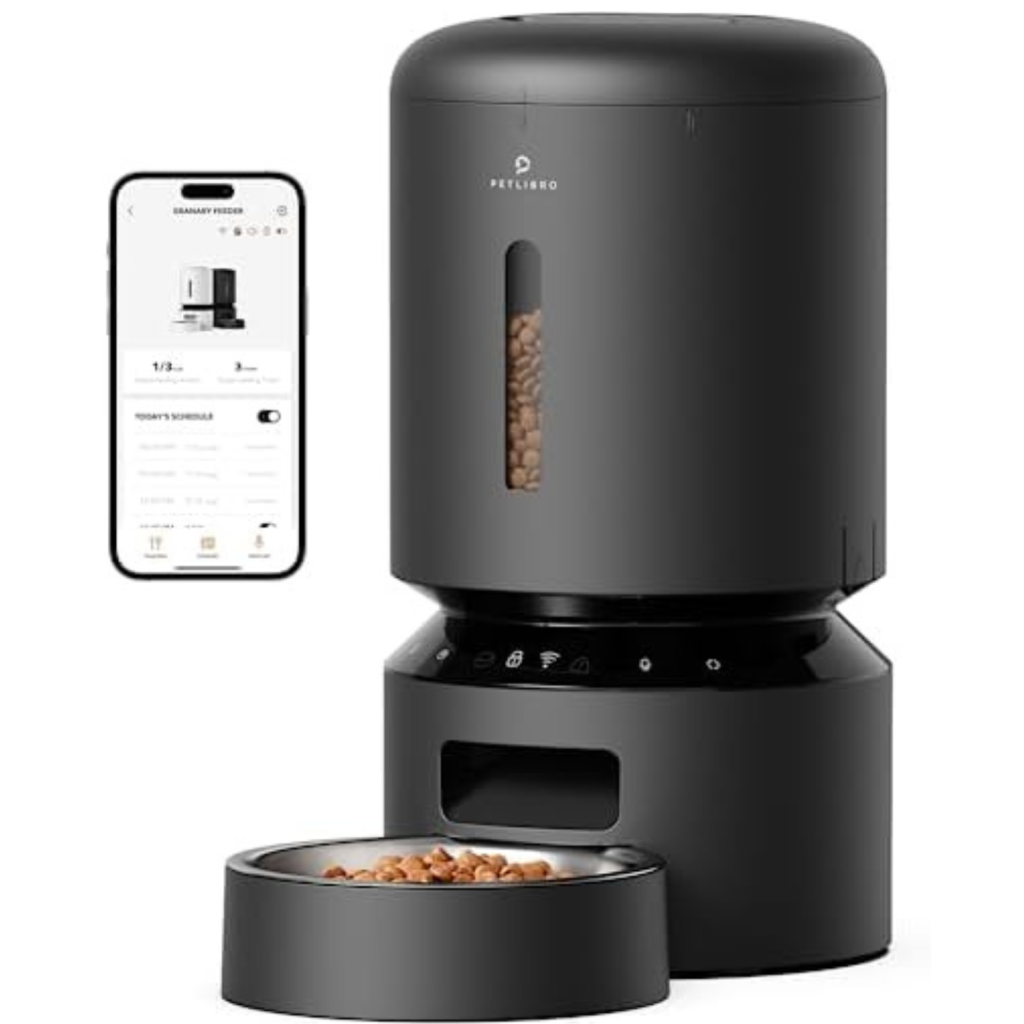
If you want to make sure your cat is fed on time, even when you’re not home, the Petlibro Automatic Cat Feeder is a game changer. But setting it up might feel tricky at first.
Don’t worry—this guide will walk you through each step clearly and simply. By the end, you’ll have your feeder programmed perfectly, so your furry friend never misses a meal. Keep reading to learn how to take control of your cat’s feeding schedule with ease.
Understanding Petlibro Automatic Cat Feeder
Understanding your Petlibro Automatic Cat Feeder is key to making feeding time smooth and stress-free for both you and your cat. This smart device offers a way to schedule meals with precision, ensuring your pet gets fed even when you’re away. Knowing its features and how it operates can save you from common feeding hassles and help you customize feeding times that suit your cat’s routine.
Design And Build Quality
The Petlibro feeder is compact yet sturdy, designed to fit easily in most home spaces. It features a clear food container that lets you monitor food levels without opening it. The build uses pet-safe materials, which means your cat’s health is a priority.
Key Components And Their Functions
- Food Hopper:Holds the dry food and dispenses it in controlled portions.
- Control Panel:Allows you to set feeding schedules and portion sizes.
- Food Tray:Where the food is delivered and where your cat eats.
- Power Supply:Can be powered by batteries or an AC adapter for flexibility.
How The Feeding Schedule Works
You can program up to four meals per day, each with customizable portion sizes. This flexibility suits cats with varying dietary needs or multiple feeding times. The feeder releases food exactly at the times you set, preventing overfeeding and ensuring regular nutrition.
Safety Features To Know
- Anti-jam Design:Prevents food from clogging the dispenser.
- Locking Lid:Keeps food fresh and stops curious paws from opening it.
- Battery Backup:Keeps the feeder running during power outages.
Why Understanding This Feeder Matters
Knowing how the feeder works helps you troubleshoot issues quickly, avoiding missed meals. It also empowers you to tailor the feeding experience to your cat’s preferences and health needs. Have you noticed how your cat reacts differently to automatic feeders? Understanding the device can help you adjust settings for their comfort.

Credit: petscathouse.com
Essential Tools And Materials
Preparing to program your Petlibro automatic cat feeder requires gathering some essential tools and materials. These items help ensure smooth setup and accurate programming. Being ready with everything saves time and prevents frustration during the process.
Below is a list of the key tools and materials needed to program your Petlibro feeder effectively.
Petlibro Automatic Cat Feeder Unit
The main device is the Petlibro automatic cat feeder. Make sure it is clean and fully assembled before starting. Check that the feeding tray and food container are properly attached.
Power Source And Batteries
Confirm that the feeder has fresh batteries installed or is plugged into a power outlet. Reliable power is critical for uninterrupted feeding schedules. Use the batteries recommended by Petlibro for best performance.
Petlibro Mobile App
Download the Petlibro app on your smartphone or tablet. The app allows easy programming of feeding times and portions. Ensure the app is updated to the latest version for compatibility.
Wi-fi Connection
A stable Wi-Fi network is necessary for syncing the feeder with the app. Check your internet connection strength near the feeder’s location. Weak signals can cause communication issues.
Cat Food
Use dry cat food that fits the feeder’s specifications. Avoid wet food or oversized kibble that may clog the dispensing mechanism. Having the right food type helps prevent feeding problems.
User Manual
Keep the Petlibro feeder user manual handy. It provides detailed instructions and troubleshooting tips. Refer to it for additional guidance while programming your feeder.
Setting Up The Device
Setting up your Petlibro Automatic Cat Feeder is simple and quick. This guide helps you prepare the device for daily use. Follow these steps to ensure it works perfectly for your pet.
Unboxing And Assembling
Open the box carefully and take out all parts. Check if you have:
- Main feeder unit
- Food container lid
- Food tray
- User manual
- Power adapter or batteries (depending on model)
Attach the food tray to the feeder’s base. Secure the lid on the food container. Make sure all parts fit snugly to avoid spills.
Inserting Batteries Or Plugging In
Locate the battery compartment under the feeder. Open it and insert fresh batteries with correct polarity. Use the recommended battery type for best performance.
If your model uses a power adapter, plug it into the feeder first. Then connect it to a power outlet. Check that the device powers on by pressing the test button.
Placing The Feeder In The Right Location
Choose a flat, stable surface for the feeder. Avoid areas near water or direct sunlight. Keep it away from places where pets may knock it over.
Place the feeder in a quiet spot your cat visits often. Make sure it is easy to access for refilling and cleaning. This helps maintain your pet’s feeding routine smoothly.

Credit: www.amazon.com
Programming Feeding Schedule
Programming the feeding schedule on your Petlibro Automatic Cat Feeder lets you control when and how much your cat eats. This feature is especially helpful if you want to maintain consistent meal times or manage your cat’s diet closely. Setting up the schedule correctly ensures your feline friend never misses a meal, even when you’re away.
Setting The Current Time
Start by setting the current time on your feeder. This step is crucial because all scheduled feedings depend on the correct clock setting. Use the feeder’s buttons or app interface to adjust the hour and minutes until it matches your local time.
Take a moment to double-check the AM/PM setting if your feeder uses a 12-hour clock. An incorrect time can cause meals to dispense at odd hours, which might confuse your cat. If you travel or experience daylight saving changes, update the time promptly to keep the schedule accurate.
Choosing Meal Times
Next, decide when your cat should eat. Most cats do well with two to four meals per day, but your cat’s age and health might require a different plan. The Petlibro feeder allows you to program multiple feeding times easily.
- Think about your cat’s natural routine—are they more active in the morning or evening?
- Space meals evenly to avoid long gaps that might lead to overeating later.
- Use the feeder’s interface to set each feeding time precisely.
Have you noticed your cat’s behavior change when meals are irregular? Consistency helps reduce anxiety and overeating, so choose times that you can stick to daily.
Adjusting Portion Sizes
Portion control is key for maintaining your cat’s healthy weight. With the Petlibro feeder, you can adjust how much food is dispensed at each meal, measured in grams or scoops. This flexibility lets you tailor portions based on your cat’s size, activity level, or dietary needs.
Experiment with portion sizes to find the right balance. Too little food might leave your cat hungry, while too much can lead to weight gain. The feeder’s memory saves your settings, so you won’t need to reset portions every day.
Wondering how much your cat should eat? Consult your vet and then use the feeder’s controls to match those recommendations precisely. This way, you provide a steady, healthy diet without guesswork.
Recording A Personalized Voice Message
Recording a personalized voice message makes feeding time special for your cat. Your cat will hear your voice calling them to eat. This helps reduce anxiety and builds a stronger bond. The Petlibro automatic cat feeder allows you to easily record a message. It plays the recording before each meal, creating a familiar and comforting routine.
Preparing To Record Your Voice Message
Find a quiet place with no background noise. Speak clearly and calmly to make your cat feel safe. Keep your message short and simple. For example, say “Dinner time, kitty!” or “Come eat, sweet cat.” This keeps your cat’s attention focused on the sound.
Using The Feeder’s Recording Button
Locate the recording button on the Petlibro feeder. Press and hold the button to start recording. Speak your message clearly into the built-in microphone. Release the button when finished. The feeder saves your voice automatically for playback.
Playing Back And Re-recording The Message
Press the playback button to listen to your recording. Make sure the sound is clear and loud enough. If you want a better message, repeat the recording steps. You can re-record as many times as needed until satisfied.
Tips For An Effective Voice Message
- Use a warm and friendly tone
- Speak slowly and clearly
- Keep the message under 10 seconds
- Use your cat’s name to get attention
- Avoid loud or harsh sounds
Testing The Feeder
Testing the Petlibro automatic cat feeder ensures it works properly before regular use. This step checks if the feeder dispenses food correctly and safely. It helps avoid feeding issues and keeps your cat happy. Follow simple actions to confirm the feeder runs smoothly.
Running A Test Feed
Start by filling the feeder with your cat’s food. Use the manual feed button or app command to release a portion. Watch the food as it drops to the bowl. Check the amount released matches the set portion size. Repeat this test a few times to confirm consistency. This step confirms the feeder delivers meals as programmed.
Checking For Obstructions
Look inside the food container and dispensing chute. Remove any clumps or stuck pieces that block food flow. Clear debris or dust that can jam the mechanism. Gently shake the feeder to loosen stuck kibble. Make sure the feeding path is clear and smooth. Regular checks prevent feeding interruptions and keep the feeder reliable.
Troubleshooting Common Issues
Troubleshooting your Petlibro Automatic Cat Feeder can save you time and prevent your cat from missing meals. Some issues are simple to fix once you know what to look for. Let’s dive into the most common problems and how you can quickly resolve them to keep feeding smooth and stress-free.
Dealing With Power Failures
Power interruptions can disrupt your feeder’s schedule, leaving your cat hungry. Check if the feeder is properly plugged in or if the batteries need replacing. Sometimes, the power adapter might look connected but isn’t fully seated—give it a gentle push to ensure a secure connection.
If your feeder uses batteries, always keep spares handy. Have you ever noticed your feeder stop working suddenly? It’s often the batteries running low without warning. Using high-quality batteries can reduce the frequency of these surprises.
Also, consider whether your feeder has a backup power option. Some models switch to battery power automatically when unplugged. If yours doesn’t, you might want to keep a close eye on power sources during outages.
Resolving Feeding Mechanism Problems
When the feeder doesn’t release food, the mechanism might be jammed or dirty. Open the feeder and inspect for any stuck kibble pieces or dust buildup. Cleaning the feeding tray and the dispenser regularly helps prevent clogs.
Have you tried gently rotating the feeding wheel by hand? Sometimes the motor stalls because the wheel is stuck. If it resists turning, carefully remove obstructions or debris blocking the path.
Another common issue is programming errors causing the feeder to skip meals. Double-check your feeding schedule and portion sizes in the app or control panel. Small mistakes in time settings can lead to missed feedings without any warning signals.
Maintenance And Cleaning Tips
Keeping your Petlibro Automatic Cat Feeder clean and well-maintained ensures it works smoothly and keeps your cat’s food fresh. Neglecting cleaning can cause food buildup, which might jam the feeder or attract pests. A little regular care goes a long way in avoiding bigger problems down the line.
Cleaning The Food Tray And Hopper
Remove the food tray and hopper regularly for cleaning. Use warm, soapy water and a soft cloth or sponge to wipe away any food residue. Avoid harsh chemicals that could leave harmful residues.
Dry the parts thoroughly before reassembling to prevent mold or mildew. Have you noticed your cat turning away from food sometimes? It might be a sign the feeder needs a good clean.
Wiping Down The Exterior
Dust and spills can accumulate on the feeder’s outer surface. Wipe it down with a damp cloth at least once a week to keep it looking fresh. Pay special attention to buttons and the display screen to ensure they stay responsive.
Keeping the exterior clean also helps you spot any damage early, like cracks or loose parts, which you can fix before they cause issues.
Checking And Replacing Batteries
If your feeder uses batteries, check them regularly to avoid sudden power loss. Weak batteries can cause the feeder to malfunction or stop working altogether. Replace batteries as soon as you notice the feeder acting sluggish or the display dimming.
Have you set a reminder for battery checks? It’s easy to forget, but doing it on a schedule saves you from unexpected feeding interruptions.
Ensuring Proper Food Storage
Store your cat food in a cool, dry place to maintain freshness before adding it to the feeder. Avoid overfilling the hopper to reduce the chance of food clumping or spoiling. You might find your cat prefers smaller, more frequent meals, which also helps keep the feeder cleaner.
Think about how you store your cat’s food—could a simple change prevent issues with your feeder?
Safety Precautions
Safety should always be your top priority when programming the Petlibro Automatic Cat Feeder. Proper precautions help avoid feeding errors and keep your feline friend healthy and happy. Paying attention to these details prevents accidents and ensures the feeder works smoothly.
Keep The Feeder Clean And Dry
Food residue or moisture inside the feeder can cause mold or clog the dispensing mechanism. Make sure to clean the feeder regularly, especially the food compartment and dispensing tray. A dry feeder prevents food spoilage and keeps your cat safe from harmful bacteria.
Avoid Overfeeding By Setting Correct Portions
Programming the feeder with the wrong portion size can lead to overfeeding or underfeeding. Use the Petlibro app or control panel to carefully adjust meal sizes based on your cat’s weight and activity level. Overfeeding can cause obesity, while underfeeding affects your cat’s energy and health.
Place The Feeder On A Stable Surface
Ensure the feeder sits firmly on a flat surface to prevent tipping or spilling food. Unstable placement can scare your cat or damage the device. Have you checked if the feeder wobbles before starting the programming?
Check Battery And Power Supply Regularly
A power interruption can stop scheduled feeding and confuse your cat. Always keep batteries fresh or confirm the feeder is plugged into a reliable outlet. Don’t forget to test the feeder after programming to make sure it works as expected.
Keep The Feeder Out Of Reach Of Other Pets
If you have multiple pets, place the feeder in a spot where only the intended cat can access it. This avoids food theft or aggression between animals. Have you considered using a microchip-activated feeder model if your pet group is large?

Credit: petlibro.com
Frequently Asked Questions
How Do I Set The Time On Petlibro Feeder?
To set the time, press the clock button until the display blinks. Use plus and minus buttons to adjust hours and minutes. Confirm by pressing the clock button again. This ensures accurate feeding schedules for your cat.
Can I Program Multiple Feeding Times?
Yes, Petlibro feeder allows up to 8 feeding schedules. You can set different meal times and portion sizes for each. This helps maintain your cat’s diet and prevents overeating.
How To Adjust Portion Size On Petlibro Feeder?
Press the portion button to select meal size. Use plus or minus buttons to increase or decrease food amount. Confirm your choice with the portion button. This controls your cat’s calorie intake precisely.
What To Do If Feeder Doesn’t Dispense Food?
Check if the feeder is properly plugged in and has enough food. Clean the dispenser to remove clogs. Reset the device by unplugging and plugging it back. Contact support if issues persist.
Conclusion
Programming your Petlibro Automatic Cat Feeder is simple and quick. Follow each step carefully to avoid errors. Set feeding times and portions that suit your cat’s needs. Double-check settings before starting the feeder. Enjoy peace of mind knowing your cat eats on time.
Consistent feeding helps keep your pet healthy and happy. Try adjusting schedules as needed to fit your routine. This feeder saves time and ensures your cat never misses a meal. Easy to use, even for beginners. Give it a try today!

Lily Purrington is the founder of MyKittyPicks.com, a cozy corner of the web dedicated to helping cat lovers discover the best cat products, furniture, toys, and home decor ideas.
A lifelong cat enthusiast, Lily shares trusted tips, honest product recommendations, and stylish inspiration designed to keep kitties happy and homes beautiful.
Her mission is simple: to bring together practical advice and purr-fect picks that make life better for cats and the people who love them.


